TK1971 Register — How to Sign Up

TK1971 is one of Bangladesh's most active gaming platforms with over 700,000 registered players. Registration takes under two minutes - you only need a mobile number, a password, and agreement to the terms. After signing up you get instant access to 24,000+ games, bKash and Nagad deposits, VIP rewards, and a welcome bonus of up to 3,000 BDT. This guide covers every step of the process, from opening the form to securing your account.

Who Can Register at TK1971

Before filling out the form, check three basic requirements:

Requirement Details
Minimum age 18 years and older
Country Bangladesh (BDT account, local MFS supported)
Accounts per person Strictly one account per person, phone, IP, and payment method

Using the same phone number, IP address, or bKash wallet for two accounts is treated as fraud under platform rules. One device, one account - this rule is enforced automatically.

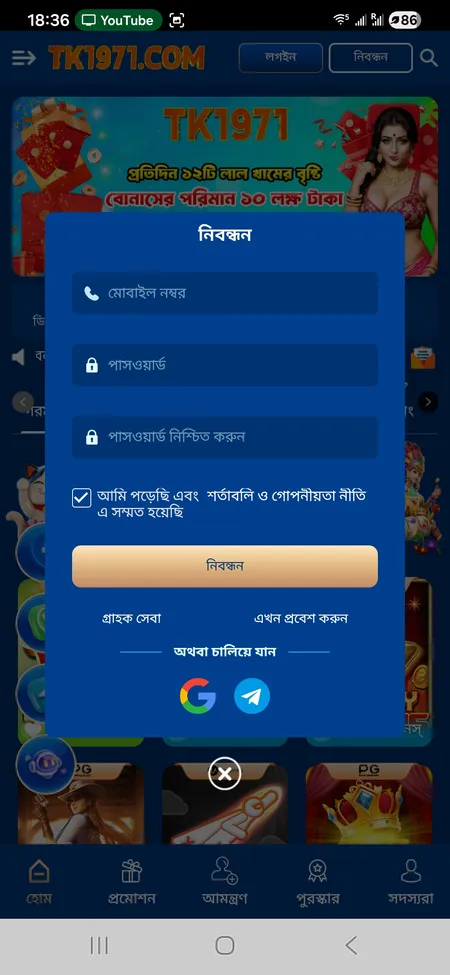
TK1971 registration form on mobile

The registration popup with mobile number, password, confirm password fields and the Terms agreement checkbox.

Where to Find the Registration Button

On the website (tk1971game.com or tk1971.org), the orange 'নিবন্ধন' (Registration) button sits in the top right corner of the header, next to the Login button. On mobile, the same button appears in the sticky top bar. Inside the app, both Login and Registration are visible immediately on the home screen without scrolling.

You can also reach the registration form directly through any referral link (format: t-k-1-9-7.biz/?r=...) shared by an existing member.

Open Registration Form

Registration Methods Available

TK1971 supports three ways to create a new account:

  • Phone number - the primary and most common method in Bangladesh; enter your local mobile number and set a password
  • Google account - one-click signup via the 'Or continue with' section in the registration popup
  • Telegram account - same section; links your Telegram identity directly to the platform account

The phone method is recommended because it connects your account to bKash or Nagad for deposits and withdrawals. Google and Telegram logins are faster but may require adding a phone number later for payment verification.

Step-by-Step: How to Register by Phone

Follow these steps to complete standard registration:

Registration Process

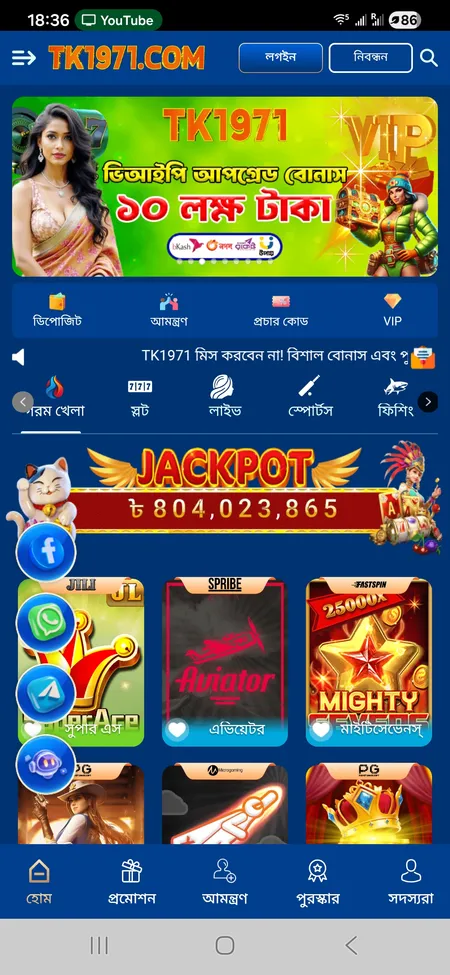
  1. TK1971 home screen with register button

    Open tk1971game.com or tk1971.org in your browser or launch the app. Tap the orange 'নিবন্ধন' (Registration) button in the top right corner.

  2. Registration form fields on TK1971

    Fill in the form: enter your Bangladesh mobile number in the 'মোবাইল নম্বর' field, then create a password and repeat it in 'পাসওয়ার্ড নিশ্চিত করুন'. Tick the checkbox to agree to the Terms and Privacy Policy.

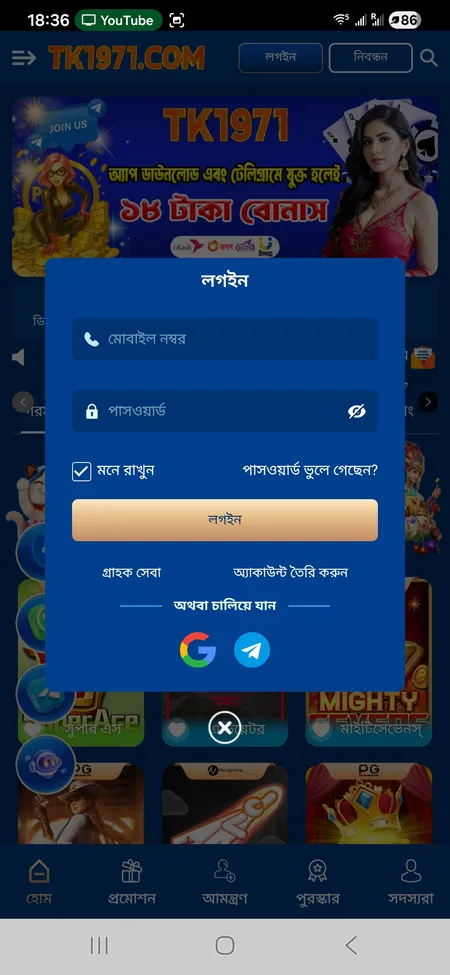
  3. TK1971 login screen after account creation

    Tap 'নিবন্ধন' (Register) to submit. The system creates your account instantly. You will be logged in automatically or prompted to log in with the credentials you just set.

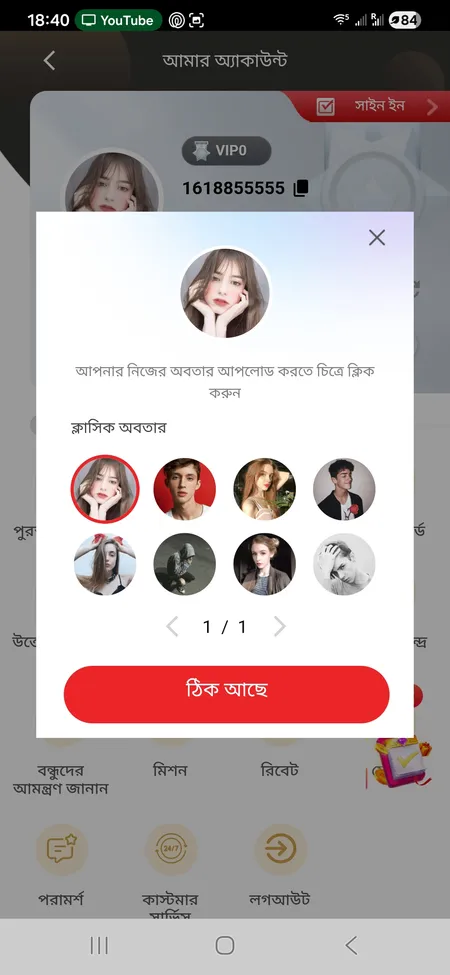
  4. Avatar selection screen in TK1971 account

    After first login, set up your profile: choose an avatar (upload your own or pick a classic one), confirm your nickname, and check your User ID in the account panel.

Register Now

Registration Form Fields Explained

The popup form 'নিবন্ধন' contains:

Field What to Enter
মোবাইল নম্বর (Mobile number) Your active Bangladesh number (used for OTP and payments)
পাসওয়ার্ড (Password) Create a strong unique password
পাসওয়ার্ড নিশ্চিত করুন (Confirm password) Repeat the same password exactly
Terms checkbox Must be ticked to proceed

Enter your real name at this stage if requested - it must match the name on your bKash or Nagad account. A mismatch between your profile name and your MFS wallet name is the most common reason withdrawals get blocked.

TK1971 recommends using your real full name from the start. This is required for identity verification (KYC) and for matching your payment method during withdrawal. Correct data at registration saves time later.

Password and Account Security

There is no published minimum character count in the platform's UI, but standard security practice applies: use at least 8 characters, mix letters and numbers, and avoid reusing passwords from other services.

After registration, consider these security steps:

  • Enable two-factor authentication (2FA) if offered in account settings
  • Set a separate transaction password (লেনদেন পাসওয়ার্ড) required for withdrawals - this is different from your login password
  • Do not share your credentials through Telegram or WhatsApp messages, even if the request appears to come from support
  • If you lose access, recovery is handled through 24/7 customer support, not automated reset

All official support is available at TK1971 main platform, through the in-app chat or the Telegram channel listed on the site.

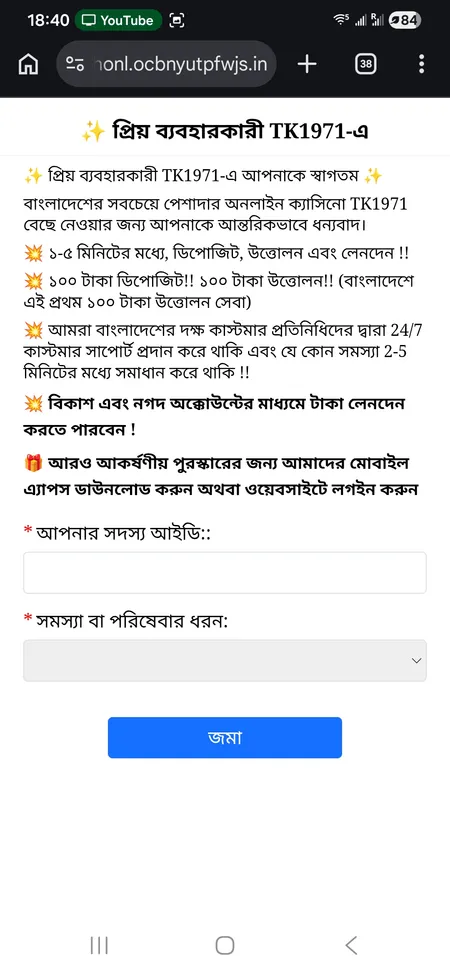
TK1971 customer support page

Support form on the TK1971 website - submit your Member ID and describe the issue to get help with login or account recovery.

KYC Verification After Registration

TK1971 does not require document upload at the moment of registration. However, KYC verification becomes mandatory before your first withdrawal, especially for larger amounts. The platform may request:

  • A photo ID (National ID card or passport)
  • Confirmation that the name in your profile matches your MFS account

Completing KYC early prevents delays. Players who enter incorrect names at registration and then request a withdrawal face holds until the data is corrected.

Create TK1971 Account

Bonuses Available After Registration

New members have access to several immediate offers:

  • App download + Telegram join: 18 BDT bonus credited automatically after downloading the APK and joining the official Telegram channel
  • First deposit bonus: up to 82% rebate on your first recharge of 100 BDT, with a maximum bonus of 3,000 BDT; wagering requirement is 10x and the bonus applies to slots only
  • Mystery bonus: random cash credits distributed to all registered accounts without any claim required; no wagering task attached

The welcome bonus is available once per account. Any attempt to claim it from a second account using the same phone, IP, or bKash number results in cancellation of both accounts.

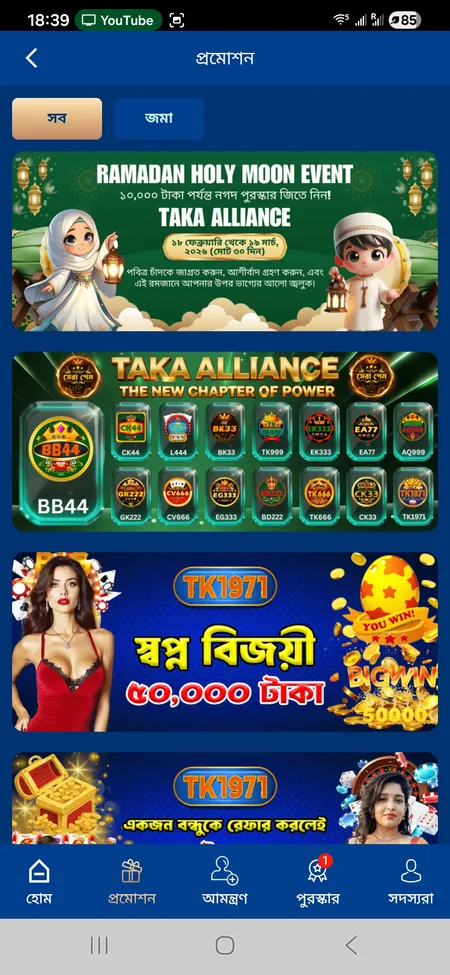
Check the full list of current promotions on the TK1971 sports and promotions section.

TK1971 promotions page with Ramadan and Dream Winner offers

The promotions screen shows active campaigns including Ramadan bonus, Dream Winner 50,000 BDT, and referral rewards for new and existing members.

Registering via the Mobile App

The Android APK is downloaded directly from the TK1971 website - it is not available on Google Play. For iOS, the platform offers a web-optimised version accessible through Safari with an option to add it to your home screen.

Registration inside the app uses the same form and the same credentials as the website. There is no separate app account - one login works across all access points. The app supports biometric login (fingerprint, Face ID) after initial setup.

To get the app, visit the TK1971 app download page and follow the install instructions for Android or iPhone.

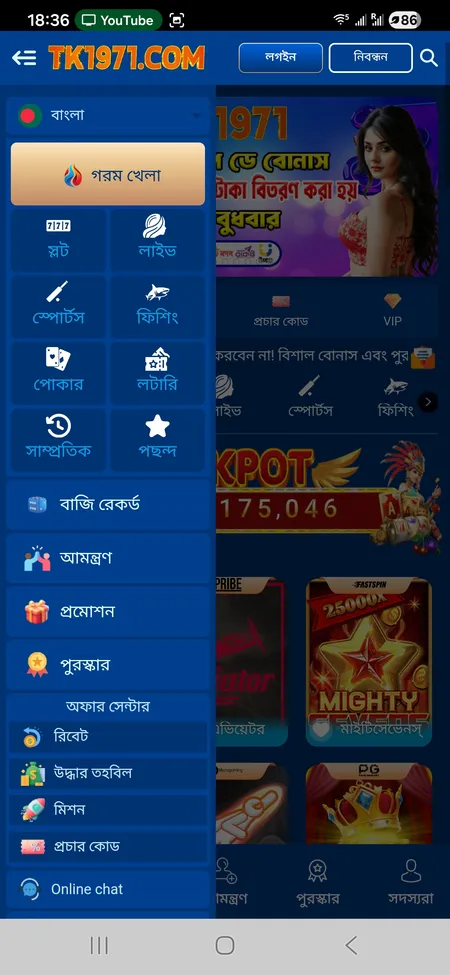
TK1971 app side menu with categories

Android Registration

Download the APK from the official TK1971 website. Install it by enabling 'Unknown sources' in your Android settings. Open the app, tap Registration, and complete the same phone-number form. One account syncs across app and browser.

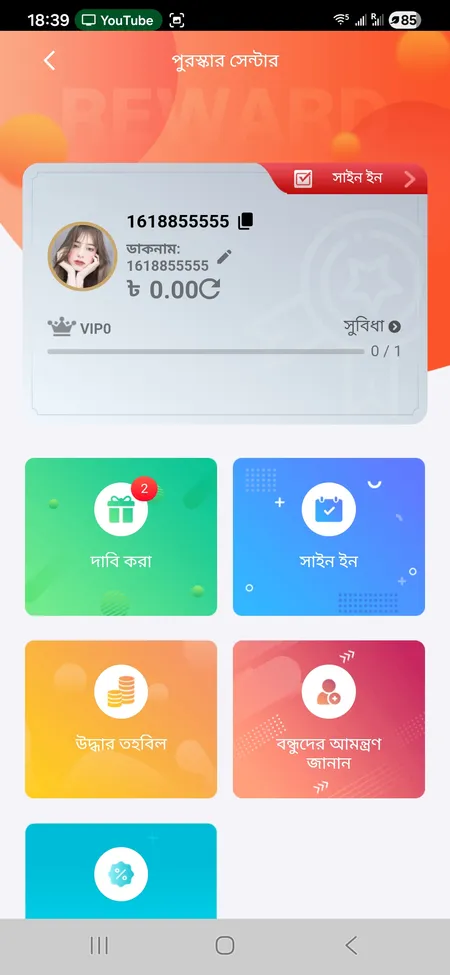
TK1971 reward center after login

iOS Registration

On iPhone, open tk1971game.com in Safari, tap the share icon, and choose 'Add to Home Screen'. The web app loads like a native app. Registration steps are identical to the mobile browser version.

Common Registration Problems and Fixes

Problem Likely Cause Solution
'Number already registered' Phone used before or on another account Use a different number or contact support
OTP not received Network delay or wrong number entered Wait 60 seconds, check the number, resend
Password mismatch error Confirm password field differs Retype both fields carefully
Form won't submit Terms checkbox not ticked Tick the agreement checkbox and retry
Account blocked after first login Second account detected on same IP Contact 24/7 support via chat or Telegram

If none of these apply, reach out through the live chat button on the site (Online chat) or via Telegram. Support operates 24/7 in Bengali and English and claims average response within 2-5 minutes.

Ready to play? Complete registration at TK1971 in under two minutes and access 24,000+ games, bKash deposits from 100 BDT, and immediate welcome bonuses.

FAQ: TK1971 Registration

Can I register without a Bangladesh phone number?

The primary registration method requires a local mobile number. Google and Telegram logins are available as alternatives, but a Bangladesh number is needed to connect bKash or Nagad for deposits and withdrawals.

Is there an age verification step during registration?

The form does not include a document upload at sign-up, but the platform enforces an 18+ rule. KYC documents may be requested before your first withdrawal to confirm age and identity.

Can I have two accounts if I use different phones?

No. TK1971 rules prohibit more than one account per person regardless of the device or number used. Multiple accounts sharing the same name, bank card, or IP are flagged as fraud and can result in account closure.

How long does registration take?

Under two minutes for standard phone registration. The form has three fields plus a checkbox. Google and Telegram logins are faster - one tap after authorising the third-party service.

What happens if I enter the wrong name at registration?

You can update profile details in your account settings or by contacting support. However, the name must match your bKash or Nagad account name before any withdrawal is processed. Incorrect data delays payouts.

Is the registration form available in English?

The default interface is in Bengali (Bangla). The language can be switched via the globe or flag icon in the side menu. Support is available in both Bengali and English.

Do I get a bonus just for registering?

Registering alone does not credit a bonus automatically. However, downloading the app and joining the official Telegram channel after registration gives you 18 BDT. Your first deposit of 100 BDT or more activates the welcome rebate of up to 82%.

What is the transaction password and when do I set it?

The transaction password (লেনদেন পাসওয়ার্ড) is a separate PIN used exclusively for withdrawals. It is set inside the account settings after registration and is different from your login password.

Can I register through a referral link?

Yes. Referral links (format: t-k-1-9-7.biz/?r=...) take you directly to the registration form. The referring member earns a commission once you deposit and meet the betting requirements.

How do I log in after registration?

Use the 'লগইন' (Login) button in the top right corner. Enter your mobile number and password. You can also log in via Google or Telegram if you used those during sign-up. See the TK1971 login page for a detailed walkthrough.